Introduction
Weddings are special occasions that deserve personalized touches to make the day truly memorable. With a Cricut machine, you can create stunning, custom wedding decorations that reflect your style and theme. From invitations and signage to table decor and favors, your Cricut can help you craft beautiful elements for your big day. In this blog, we’ll guide you through various DIY wedding decoration projects you can create with your Cricut.

Materials You’ll Need
- Cricut machine: Preferably the Cricut Maker or Cricut Explore series.
- Vinyl: Permanent and removable for different applications.
- Iron-on material: For fabric-based decorations like napkins or table runners.
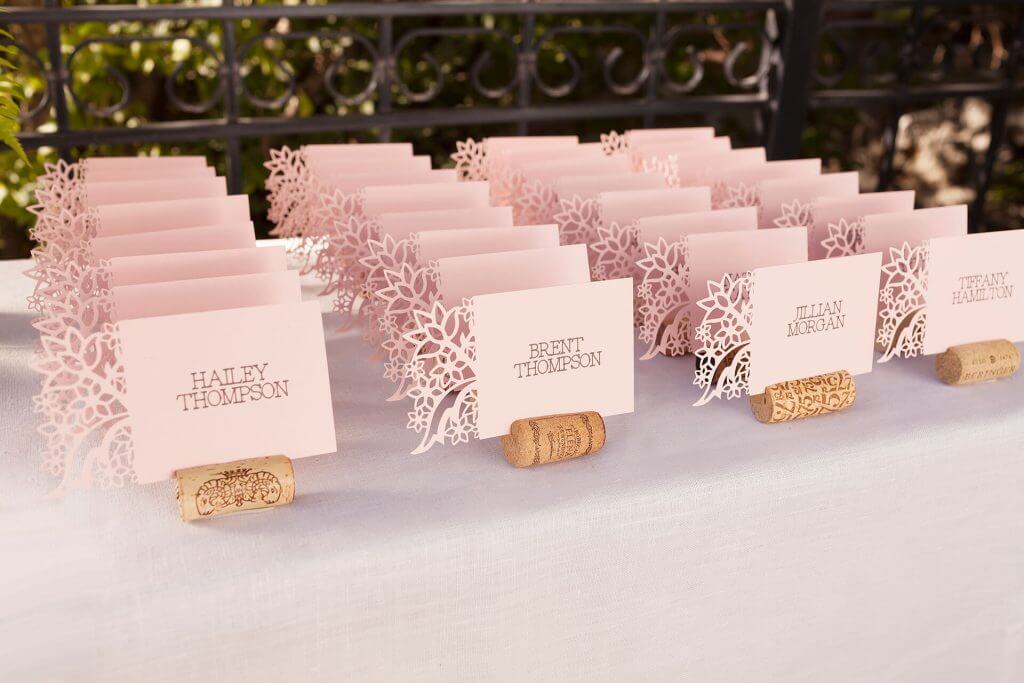
- Cardstock: For invitations, place cards, and other paper decorations.
- Transfer tape: For applying vinyl designs.
- Weeding tools: Essential for removing excess material.
- Design Space: Cricut’s design software, available on desktop and mobile devices.
Steps to Make Personalized Wedding Decorations
Step 1: Custom Wedding Invitations
Materials Needed:
- Cardstock: High-quality paper for invitations.
- Envelopes: Matching your cardstock color.
- Ribbon or twine: For an added touch.
Steps:
- Design Your Invitations in Cricut Design Space: Create a new project and design your wedding invitations with text, embellishments, and intricate details.
- Cut Your Invitations: Use your Cricut machine to cut the invitations from cardstock.
- Assemble and Add Details: Add any extra details like ribbons, wax seals, or inserts.
- Mail Your Invitations: Place the invitations in matching envelopes and send them out to your guests.
Step 2: Personalized Wedding Signage
Materials Needed:
- Wooden signs or acrylic boards: Depending on your preference.
- Vinyl: Permanent vinyl for lasting designs.
- Transfer tape: For applying the vinyl.
Steps:
- Design Your Signage in Cricut Design Space: Create designs for welcome signs, direction signs, and seating charts.
- Cut Your Vinyl: Use your Cricut machine to cut the designs from vinyl.
- Weed and Transfer: Weed the excess vinyl and use transfer tape to apply the design to your signs.
- Display Your Signs: Place the signs at your venue to guide and welcome guests.
Step 3: Custom Table Decor
Materials Needed:
- Fabric: For table runners, napkins, and other fabric elements.
- Iron-on vinyl: For adding designs to the fabric.
- Heat press or iron: To apply the iron-on vinyl.
Steps:
- Design Your Table Decor in Cricut Design Space: Create custom designs for table numbers, napkins, and runners.
- Cut Your Iron-On Vinyl: Use your Cricut machine to cut the designs from iron-on vinyl.
- Weed and Transfer: Weed the excess vinyl and apply the designs to your fabric using a heat press or iron.
- Set Your Tables: Arrange the custom table decor at your venue.
Step 4: Personalized Wedding Favors
Materials Needed:
- Small containers or bags: For holding the favors.
- Vinyl or iron-on material: For personalizing the favors.
- Ribbon or twine: For tying up the favors.
Steps:
- Design Your Favor Labels in Cricut Design Space: Create custom labels or designs for your wedding favors.
- Cut Your Designs: Use your Cricut machine to cut the designs from vinyl or iron-on material.
- Weed and Transfer: Apply the designs to your favor containers or bags.
- Assemble and Distribute: Fill the containers with favors and distribute them to your guests.
Step 5: Custom Wedding Banners and Garlands
Materials Needed:
- Cardstock: Choose colors that match your wedding theme.
- Ribbon or string: For assembling the banners and garlands.
- Adhesive: For attaching the pieces.
Steps:
- Design Your Banners and Garlands in Cricut Design Space: Create custom designs with letters, shapes, and embellishments.
- Cut Your Designs: Use your Cricut machine to cut the designs from cardstock.
- Assemble Your Banners and Garlands: Attach the pieces to ribbon or string using adhesive.
- Hang Your Decorations: Display the banners and garlands at your wedding venue.
Tips for Success
- Plan Ahead: Start your projects well in advance to ensure you have enough time to complete them.
- Use High-Quality Materials: Durable materials will ensure your decorations look professional and last throughout the event.
- Test Cuts: Do a test cut on scrap material to ensure your design and settings are correct.
- Coordinate Colors and Themes: Keep your color scheme and theme consistent across all decorations for a cohesive look.
Conclusion
Creating personalized wedding decorations with your Cricut machine allows you to add unique and meaningful touches to your special day. From custom invitations and signage to table decor and favors, your Cricut can help you craft beautiful elements that reflect your style and enhance your wedding. For more project ideas and high-quality SVG files, visit SVGKingdom.com and SVGBundle.net. Happy crafting!
FAQs
1. Can I use removable vinyl for temporary wedding decorations? Yes, removable vinyl is a great option for temporary decorations as it can be easily removed without leaving residue.
2. What type of fabric works best for making custom table runners and napkins? Sturdy fabrics like cotton or linen work well for creating durable and elegant table runners and napkins.
3. How do I clean my Cricut cutting mat after working with vinyl? Use a scraper tool to remove leftover bits and a lint roller to pick up small particles. You can also rinse it with water and let it air dry.
4. Can I design wedding decorations on my mobile device? Yes, Cricut Design Space is available as a mobile app for iOS and Android devices, allowing you to design on the go.
5. Where can I find more wedding decoration ideas and tutorials? For more inspiration and tutorials on creating wedding decorations with Cricut, check out the official Cricut blog and YouTube channel. Additionally, SVGKingdom.com and SVGBundle.net offer a wide range of SVG designs to enhance your crafting projects.
Sources
For more inspiration and tutorials, check out these external links: