200,000+ designs ready to download

SVG Files for Cricut & Silhouette Crafters

One bundle. Every theme. Instant download with a commercial licence included — so you can craft, sell, and create without limits.

4.8 out of 5
Trusted by 4,000+ crafters
Instant download
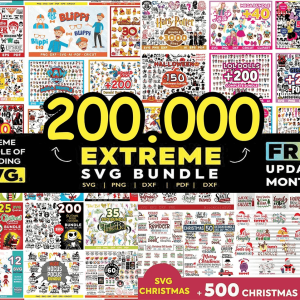
Preview of the SVG Kingdom 200,000 design bundle
After checkout
Files download instantly
Bundle includes
SVG · PNG · DXF · EPS
200,000+
SVG designs in one bundle
4.8 ★
Average buyer rating
4,000+
Crafters worldwide
Instant
Download after checkout
Works with

Customer reviews

4.8

Based on 214 verified purchases

5 ★
78%
4 ★
14%
3 ★
5%
2 ★
2%
1 ★
1%

Also used by sellers on

Etsy sellers ★★★★★
Small businesses ★★★★★
LT
Etsy seller · Dallas, TX
★★★★★
Verified purchase

Paid for itself in the first week

I run a small Etsy shop selling vinyl decals and HTV shirts. Before this I was spending $15–20 a week on individual files. I downloaded this bundle, unzipped it, and had everything sorted into folders by theme. Honestly the organisation alone saved me hours.

"The commercial licence is what really makes this worth it. I've already made back the $21.99 ten times over."
Cricut Maker HTV shirts Commercial use
MK
Hobbyist crafter · Portland, OR
★★★★★
Verified purchase

Sceptical at first — genuinely surprised

200k files for $21.99 sounds too good. I almost didn't buy it. But I saw the free SVGs on the site, tested one in Silhouette Studio and it cut perfectly — no jagged edges, no cleanup needed. Bought the bundle that same day.

"I've tested probably 60 designs so far. Every single one has cut cleanly on my Cameo 4."
Silhouette Cameo 4 Vinyl decals
SR
Small business owner · Nashville, TN
★★★★★
Verified purchase

Finally stopped paying per file

I make custom tumblers and wooden signs. I used to buy designs one at a time from different sites — $3 here, $5 there. It adds up fast. This bundle covers basically every category I need. Holidays, quotes, animals, baby stuff — it's all there.

"Support replied within a few hours when I had a download question. That matters to me when buying digital products."
Tumblers Wood signs Glowforge
JM
Laser cutter hobbyist · Austin, TX
★★★★
Verified purchase

Great value, took a while to unzip

The file is huge so give it time to download and unzip — took about 20 minutes on my laptop. Once it was done the folder structure was clear and easy to navigate. DXF files work perfectly with my laser. Would have liked a search tool but for the price you can't complain.

Laser cutter DXF files

How it works

From checkout to cutting in minutes

No software to install. No subscriptions. Just buy, download, and start making things.

1

Buy once,
own it forever

Add the bundle to your cart and checkout securely. We accept all major cards and PayPal. One payment, no renewals.

  • SSL-encrypted checkout
  • Visa, Mastercard, PayPal accepted
  • Instant order confirmation by email
2

Download your files immediately

Your download link appears on the confirmation page and in your email the moment payment clears. Files come as a ZIP — unzip and you'll find folders sorted by theme.

  • No waiting period
  • Re-download any time from your account
  • 300+ organised theme folders inside
3

Open in your machine and start cutting

Upload the SVG directly into Cricut Design Space or Silhouette Studio. Resize, colour, and cut. Commercial licence means you can sell what you make.

  • Works in Cricut Design Space
  • Works in Silhouette Studio
  • Sell finished products commercially

Every file format you need

Whether you're cutting vinyl, printing on sublimation paper, or using a laser engraver — the right format is in the bundle.

SVG PNG DXF EPS AI PDF TTF fonts

Compatible with every major machine

Cricut Maker, Maker 3, Explore Air 2 & 3, Joy
Silhouette Cameo 1, 2, 3, 4 and Portrait
Brother ScanNCut, Glowforge & most laser cutters

FAQ

Questions people ask before buying

Can't find what you're looking for? Send us a message and we'll reply within a few hours on weekdays.

Ask us a question
SVG (Scalable Vector Graphic) is the native file format for Cricut Design Space. Unlike PNG or JPG, SVG files are vector-based — they stay perfectly sharp at any size, preserve cut layers, and weed cleanly with no jagged edges. Always upload the SVG version, not the PNG, for best cutting results.
Yes. Our bundles include a commercial licence that lets you sell finished physical products — shirts, mugs, decals, signs, and more. You may not resell or redistribute the SVG files themselves as digital downloads. Full terms are on our Licensing Policy page.
Your download link appears immediately on the order confirmation page and is also sent to your email. Files come as a ZIP archive. Unzip it and you'll find folders sorted by theme. You can re-download at any time from your account page.
Unzip the downloaded folder first. Open Cricut Design Space → Upload → Upload Image → select your .SVG file → Add to Canvas. If layers appear grouped, click Ungroup. Always use the SVG file, not the PNG, to keep your cut layers intact.
Yes. The bundle includes both SVG and DXF formats, which work with Silhouette Studio for all Cameo models (1, 2, 3, 4) and the Portrait. Open Silhouette Studio → File → Open → select the SVG or DXF file.
One-time payment only. Pay once and the files are yours forever — no monthly fees, no renewals. You also get lifetime access to re-download from your account whenever you need.
Yes. Visit our free SVGs page to download a selection of designs and test them in your machine before buying. No email address required.
Email us at info@svgkingdom.com and we typically reply within a few hours on weekdays. Your files are always available to re-download from your account page, so a lost link is never a problem.