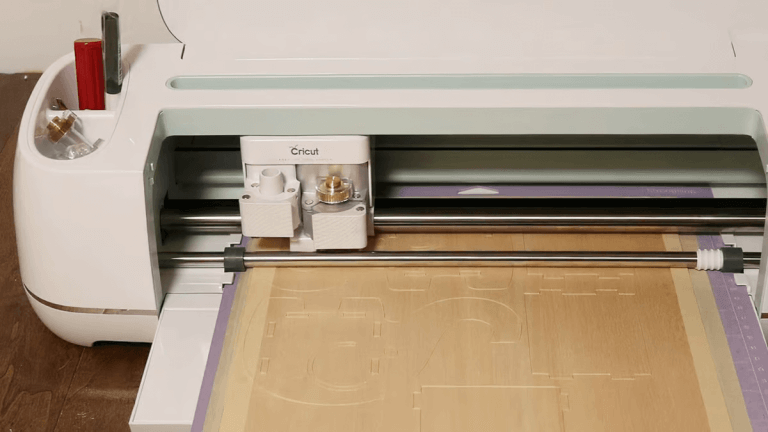
Cricut SVG Bundle Ideas for Beginners
Are you new to Cricut crafting and feeling overwhelmed by all the SVG options out there? You’re not alone! SVG bundles are a fantastic way for beginners to access a variety of designs and jumpstart their creative projects. In this guide, we’ll explore the best Cricut SVG bundle ideas for beginners, including where to find them, how to use them, and tips for making the most of your crafting experience.
Why SVG Bundles Are Perfect for Cricut Beginners
SVG files (Scalable Vector Graphics) are digital designs that can be resized without losing quality. For Cricut users, SVG bundles offer collections of themed designs, making it easier to experiment, learn, and complete projects without having to search for single files. Bundles save time, provide inspiration, and are often more affordable than purchasing individual SVGs.
Popular Cricut SVG Bundle Themes for Beginners
Choosing the right SVG bundle can spark creativity and help you master Cricut basics. Here are some beginner-friendly themes to consider:
- Seasonal/Holiday Bundles: Designs for Christmas, Halloween, Easter, or Valentine’s Day make for fun, timely projects.
- Quotes & Sayings: Simple word art or motivational phrases are easy to cut and look great on shirts, mugs, or signs.
- Floral Bundles: Flowers and leaves are classic designs that work well on cards, vinyl decals, and home décor.
- Monograms & Alphabets: Personalize gifts and accessories with stylish letters and initials.
- Animals & Pets: Cute animal SVGs are always a hit for kids’ crafts and custom apparel.
- Basic Shapes & Patterns: Geometric shapes, borders, and backgrounds help beginners practice layering and weeding techniques.
How to Use Cricut SVG Bundles
Getting started with SVG bundles is straightforward. Follow these steps:
- Download: Purchase or download a free SVG bundle from a reputable site.
- Unzip: Extract the files from the ZIP folder to your computer.
- Upload to Cricut Design Space: Use the “Upload” feature to add SVG files to your project library.
- Customize: Resize, recolor, or combine elements as needed.
- Cut & Craft: Load your material, follow the prompts, and watch your design come to life!
Tutorial Ideas Using SVG Bundles
If you’re wondering what to make with your SVG bundles, here are a few easy and rewarding project ideas:
- Custom T-Shirts: Use iron-on vinyl and a quote SVG for personalized apparel.
- Greeting Cards: Layer floral SVGs for beautiful, handmade cards.
- Wall Art: Frame a seasonal SVG cut from cardstock for instant home décor.
- Mugs & Tumblers: Add animal or monogram SVGs to mugs with permanent vinyl.
- Gift Tags: Use basic shapes and holiday SVGs to create charming tags for presents.
Tips for Choosing Quality SVG Bundles
Not all SVG bundles are created equal. Here’s how to pick the best ones for your Cricut projects:
- Check Compatibility: Ensure the SVGs are optimized for Cricut Design Space.
- Read Reviews: Look for bundles with positive feedback from other crafters.
- Preview Designs: Choose bundles that provide clear previews of included SVGs.
- Look for Layered Files: Layered SVGs give you more options for color and customization.
- Watch for Licensing: If you plan to sell your creations, make sure the bundle includes a commercial license.
Common Problems Beginners Face (And How to Solve Them)
- SVG Won’t Upload: Check that you’re uploading the .svg file, not a .png or .jpg.
- Design Looks Blurry or Pixelated: Only SVG files are vector-based; avoid using raster images.
- Cutting Errors: Make sure your material settings and blade are correct for the chosen material.
- Weeding Difficulties: Start with simple designs and use a quality weeding tool.
- Layers Not Showing Correctly: Ungroup or weld elements as needed in Design Space for proper layering.
Where to Find the Best Cricut SVG Bundles
Many websites offer high-quality SVG bundles for Cricut users. Some are free, while others offer premium collections with extended licenses. Here are a few trusted sources:
- Creative Fabrica – Extensive library of SVG bundles, including free daily downloads and affordable subscriptions.
- Design Bundles – Popular for themed bundles and frequent deals on beginner-friendly SVGs.
- Etsy – Thousands of independent SVG creators offer unique bundles with various license options.
- LoveSVG – Free and premium SVG files designed specifically for crafters.
- SVG House – Curates beginner-friendly and trending SVG bundles for Cricut and Silhouette users.
Conclusion
Cricut SVG bundle ideas for beginners open the door to endless crafting possibilities. By choosing the right bundles, practicing with simple projects, and exploring new themes, you’ll quickly build your skills and confidence. Don’t forget to use reputable resources and always check licensing if you plan to sell your creations. Happy crafting!
Resources
- Cricut: Uploading Images to Design Space
- Creative Fabrica: SVG Bundles
- Design Bundles: SVGs for Cricut
- LoveSVG: Free SVGs
- Etsy: Cricut SVG Bundles
FAQs
What is an SVG bundle for Cricut?
An SVG bundle is a collection of SVG design files packaged together, often around a theme, allowing Cricut users to download multiple designs at once for various projects.
How do I upload SVG bundles to Cricut Design Space?
Unzip the bundle, then use the “Upload” button in Cricut Design Space to select and add each SVG file to your project library.
Are free SVG bundles safe to use?
Yes, as long as you download from reputable websites like Creative Fabrica, LoveSVG, or Design Bundles, free SVGs are safe and high-quality.
Can I sell items made with SVG bundle designs?
You can sell items if the bundle includes a commercial license. Always check the licensing terms before selling products featuring these designs.
What are the easiest SVG projects for beginners?
Simple T-shirts, mugs, greeting cards, and wall art using single-layer SVGs are perfect for beginners to practice and build confidence.