Cute Cat Outline SVG for Vinyl Decals: A Crafter’s Guide
Imagine transforming everyday objects into adorable, custom creations—just by adding a cute cat outline SVG for vinyl decals! Whether you’re personalizing a water bottle, jazzing up your laptop, or creating gifts for friends, these stylish feline outlines make every project purr-fectly unique. Read on to explore everything you need to know about using cute cat outline SVGs with Cricut and Silhouette machines, including beginner tips, material recommendations, and creative inspiration.
What is a Cute Cat Outline SVG?
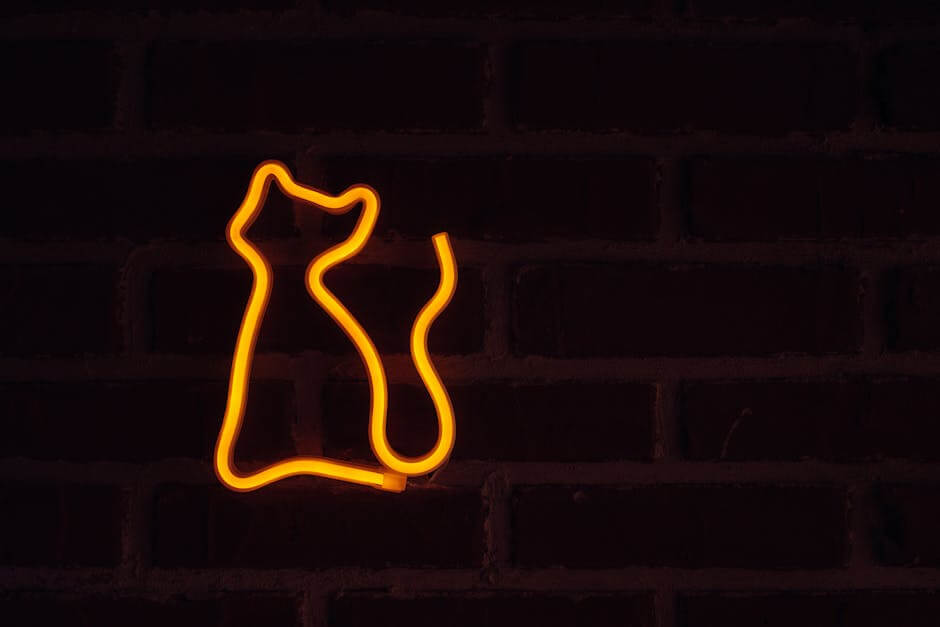
An SVG (Scalable Vector Graphic) is a digital file format that stores images as mathematical paths rather than pixels. This means SVGs can be resized endlessly without losing quality—perfect for crafting, where you might want a tiny cat for a mug or a large decal for a wall. A cute cat outline SVG specifically is a simple, charming drawing of a cat’s silhouette, designed for easy cutting with vinyl cutting machines like Cricut or Silhouette.
Why SVGs are Ideal for Vinyl Decals
SVG files are the industry standard for digital cutting machines because they:
- Offer crisp, clean lines at any size
- Are easy to edit or customize
- Work seamlessly with design software
- Enable precise cutting, even for intricate designs
Common Uses for Cute Cat Outline SVGs
Cat outline SVGs are loved by crafters for their versatility and timeless appeal. Here are some fun and popular ways to use them for vinyl decals:
- Laptop and phone stickers: Personalize your tech with a subtle or bold feline touch.
- Car windows: Show your love for cats with a weather-resistant vinyl decal.
- Water bottles and mugs: Add a playful design to drinkware for gifts or personal use.
- Home décor: Apply to mirrors, walls, or picture frames for a modern, minimalist look.
- Scrapbooking and card making: Use the SVG as a cutting template or as printed embellishments.
- Clothing and tote bags: With heat transfer vinyl, you can press your cat outline onto fabric.
Ideas for Personalization
SVGs are easy to customize. Add a name, a quote, or incorporate the outline into a bigger scene. You can even adjust the thickness of the outline or combine it with other shapes for a truly unique design.
Best Materials for Cat Outline Vinyl Decals
Choosing the right materials helps your cute cat vinyl decal last longer and look its best. Here are the most popular options:
- Permanent Adhesive Vinyl: Great for outdoor items, glass, and hard surfaces. Brands like Oracal 651 are durable and weather-resistant.
- Removable Vinyl: Ideal for wall decals, notebooks, or temporary projects. It peels off easily without leaving residue.
- Heat Transfer Vinyl (HTV): Perfect for fabric projects like t-shirts, tote bags, and hats. Requires a heat press or iron.
- Glitter, Holographic, or Patterned Vinyl: Adds a fun twist to simple outlines, making your cat decal stand out.
Choosing the Right Vinyl
For beginners, start with standard adhesive vinyl. It’s affordable, easy to weed, and forgiving during application. As you gain confidence, experiment with specialty vinyls to achieve different effects.
How to Use a Cute Cat Outline SVG with Cricut or Silhouette
Getting started is simple, even if you’re new to cutting machines. Here’s a step-by-step guide:
- Download the SVG: Save your cute cat outline SVG to your computer.
- Upload to Design Software: Open Cricut Design Space or Silhouette Studio and import the SVG file.
- Resize & Customize: Adjust the cat outline to your desired size. Add personalization or combine with other elements, if you wish.
- Prepare Your Vinyl: Cut a piece of vinyl slightly larger than your design. Place it onto your cutting mat.
- Cut the Design: Select the correct material setting (vinyl, HTV, etc.) and send the cut job to your machine.
- Weed the Excess: Carefully peel away the vinyl that isn’t part of your design, leaving the cat outline intact.
- Transfer & Apply: Use transfer tape to lift the design and place it onto your chosen surface. Smooth out any bubbles, then gently peel away the tape.
Beginner Tips for Success
- Start simple: Choose a clean, bold cat outline for your first project. Thin lines or intricate details can be more challenging to weed.
- Use quality tools: Invest in a good weeding tool and scraper. This makes removing excess vinyl and applying your decal much easier.
- Test cut: Always do a small test cut on your vinyl to check your settings before committing to a larger piece.
- Low-tack transfer tape: If your decal is delicate, use low-tack tape to avoid tearing or stretching the design.
- Clean surfaces: Always clean and dry the application area thoroughly before applying your decal for best adhesion.
Creative Ideas for Cute Cat Outline Vinyl Decals
Once you’re comfortable with the basics, let your creativity take over! Here are a few inspiring ways to use cat outline SVGs in your next project:
- Make matching cat-themed mugs for your family or friends
- Create a gallery wall of different cat poses in various colors
- Personalize your pet’s food container with a custom decal
- Design funny “cat mom” or “cat dad” t-shirts using HTV
- Decorate greeting cards with layered paper cat outlines
- Gift custom cat car decals to fellow feline enthusiasts
Where to Find Quality Cute Cat Outline SVGs
High-quality SVG files make a world of difference in your crafting experience. Look for files with smooth, clean lines and compatibility with your machine’s software. Many websites offer free and premium SVGs, but be sure to check the licensing if you plan to sell your finished products.
If you’re ready to dive in and explore thousands of creative SVG designs, including adorable cat outlines, check out SVG Kingdom’s massive library—perfect for crafters of all levels!
Conclusion
Using a cute cat outline SVG for vinyl decals is an easy and rewarding way to personalize just about anything. Whether you’re a seasoned crafter or just starting out, you’ll love how simple it is to work with SVG files on your Cricut or Silhouette machine. From gifts to home décor, the possibilities are endless. Ready to get started? Explore thousands of SVG designs here and bring your feline-inspired visions to life!
Resources
- How to Use SVG Files in Cricut Design Space
- How to Use SVG Files in Silhouette Studio
- Oracal 651 Vinyl Product Details
- HTV vs. Adhesive Vinyl Explained
- SVG Kingdom: 200,000+ SVG Designs
FAQs
What is a cute cat outline SVG used for?
It’s a digital file featuring a simple cat silhouette, perfect for cutting vinyl decals with machines like Cricut or Silhouette. Use it to decorate mugs, laptops, car windows, and more.
Can I resize a cat outline SVG without losing quality?
Yes! SVGs are vector files, so you can resize them to any dimension and they’ll always stay crisp and clear.
What type of vinyl works best for decals?
Permanent adhesive vinyl (like Oracal 651) is best for most surfaces. Use removable vinyl for walls and HTV for fabrics.
Are SVG files compatible with both Cricut and Silhouette?
Absolutely. Both Cricut Design Space and Silhouette Studio (Designer Edition and up) support SVG files.
Where can I find free or premium cute cat outline SVGs?
You can find a variety of SVGs on crafting websites like SVG Kingdom, as well as design marketplaces and free SVG resources online.